


Day Trading SImulator & Games
4.6189.00 Reviews
App Specs
- Version
- 2.2.244
- Updated On
- License
- Free
- Downloads
- 1,000,000+
- Developer
- Kovets
- Categories
- Finance
- Platform
- Android
Screenshots
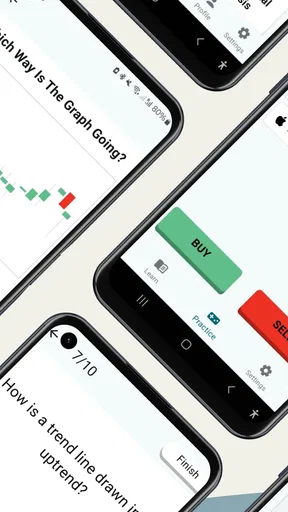
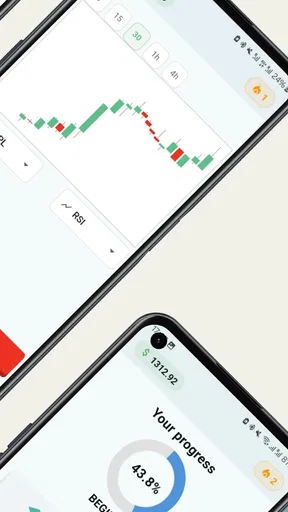
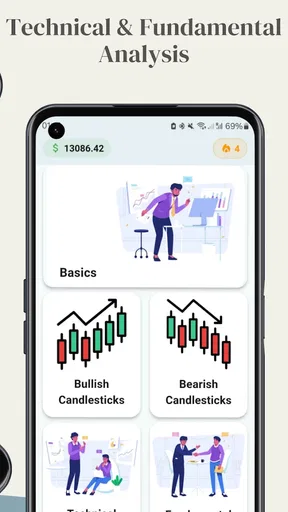
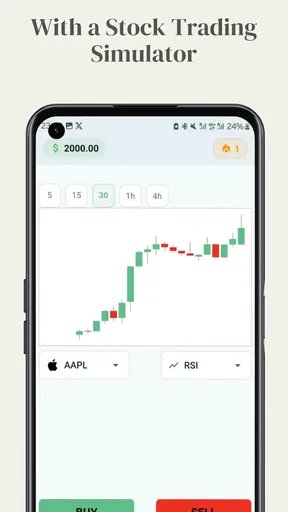
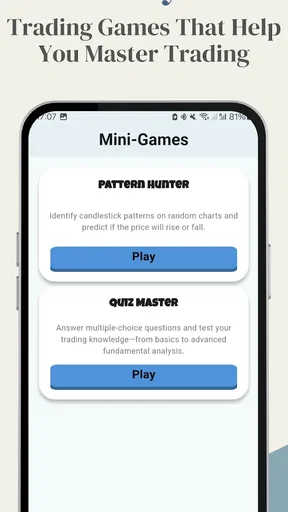
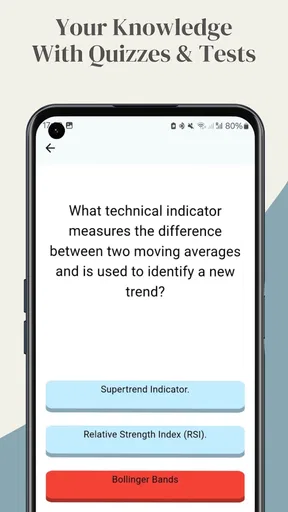
 Analysis by AppCompare
I tend to get stuck with a trading simulator before I ever make a virtual trade: I’m not sure what the exercise is teaching, or whether a result reflects a sensible decision or a lucky move. Day Trading Simulator & Games is intended to make practice approachable, but I’d treat it as a place to explore decisions rather than a shortcut to becoming a trader. That distinction matters, especially if you’re trying to decide whether a game-like finance app suits the way you want to learn.
It’s a free finance app from Kovets, with a 4.6 average from around 12,000 ratings and over a million installs. It’s rated for Everyone, and the current version is 2.2.242, for devices running Android 8.0 or later. Optional in-app purchases range from $4.49 to $117.30 per item, so “free” describes the starting point, not necessarily every available purchase. I’d check the purchase details before paying for anything and decide whether the free experience already meets your needs.
Getting oriented and working through snags
I’d start by separating a confusing lesson from a technical snag: one may call for a slower pass through the instructions, while the other may simply need a fresh launch. In the next section, I’ll focus on simple checks that help make that distinction before you spend time repeating a session or reconsidering an optional purchase.
Where a new user can get stuck
Even a friendly interface can leave a beginner with practical questions: What should I try first? How do I tell whether a strategy is working? And what does a simulated win actually prove? The app’s educational and game-oriented approach is appealing, but I’d avoid treating a good score as evidence that the same choice would work in a real market. A simulator can help you practice thinking through trades; it cannot make uncertainty disappear.
The original experience I found straightforward to navigate, and its tutorials, tips, glossary, quizzes, and interactive lessons give new users several ways to approach unfamiliar language. If a term interrupts your reading, checking the glossary before continuing is more useful than guessing from context. I’d also take lessons in short sessions and apply one concept at a time. Trying to absorb several new trading ideas while chasing a challenge can blur what you have actually learned.
Setup checks before blaming the app
If the first session feels confusing, I’d begin with the basics: confirm that the device meets the Android minimum, make sure the installation has completed, and reopen the app if a screen seems stuck. A finance simulator is easier to judge when you are not also trying to learn its layout, so I’d start with one tutorial or solo activity rather than tapping through every option at once. These are simple checks, but they help separate setup friction from questions about how the lessons work.
There is a version for iOS as well as Android, but the version and minimum operating-system detail here apply to Android. If you are using an iPhone or iPad, check the requirements shown for that device before installing. Either way, I’d avoid making a purchase just to resolve uncertainty about the basic experience: first see how far the free app gets you, then judge whether an optional item offers something you actually want.
Worth Reading Before You Choose

EA SPORTS FC Mobile 26 Is a Bigger Football Game, but It Takes Time

Flipboard Shows What News Apps Must Do Beyond the Feed

Switching to Android Auto Means Rethinking Your Driving Routine

Google Calendar Makes a Crowded Week Easier to Manage

Ludo King Makes the Most of the Minutes Between Plans

Baby Panda World Brings Quick Play to Modern Phones, but Its Game Library Feels Busy
Recovering a useful practice session
When a session goes off track, I find it more useful to pause than to keep making virtual trades just to recover a score. Return to the lesson or challenge you were working on, identify the decision you meant to practice, and try again with that single goal in mind. For example, if you were trying to read a trend, focus on what you observed and why you acted rather than on whether the simulated result happened to be positive.
That habit also makes challenges more educational. A leaderboard can make it tempting to copy a high-ranking player or chase a position, but a ranking tells you how a user performed within the app’s competition, not whether their approach fits your goals. I’d use competition as a reason to stay engaged, then review my own choices separately. If an activity stops being understandable or enjoyable, switching to a lesson is a better recovery than forcing another round.
When the app may not be the cause
A disappointing result in a simulator does not automatically mean something is broken. In trading practice, the outcome may differ from what you expected because your interpretation or timing was off; that can be a useful lesson rather than a technical fault. I’d first check whether the activity is asking me to meet a particular goal and whether I have followed its instructions. If the app itself is unresponsive, closing and reopening it is a reasonable basic step before deciding the problem is with the exercise.
It is equally important to keep real-world expectations separate. Virtual practice removes the risk of losing your own money in the simulation, but it cannot reproduce every pressure or consequence of using a real brokerage account. If your main aim is to place actual trades, compare live broker tools and their costs, protections, and risks instead of assuming this learning app can replace them. If your aim is to become familiar with market vocabulary and decision-making, the lower-stakes setting is a more appropriate fit.
How I’d use the lessons, games, and social features
The app combines instruction with scenarios and challenges, which gives me a choice between learning a concept and testing it in a more playful setting. I’d use a tutorial or glossary entry first, then move to a solo challenge to see whether I can apply the idea without immediately leaning on other users’ results. That sequence is a practical way to notice gaps: if I can explain a term but struggle to use it in a decision, I know what to revisit.
The original review also found competitive tournaments, social interaction, events, and a leaderboard. Those elements may help someone who enjoys learning alongside other people, but they can distract a user who wants a quiet, structured course. I’d treat tips shared by other users as discussion, not as instructions to follow blindly. The most useful takeaway from a community exchange is often the reasoning behind a choice; copying the choice itself may teach very little.
Using the dashboard without turning it into noise
A customizable dashboard and notifications can make the experience feel more personal, but I would keep the setup restrained at first. Add only what helps you follow the exercise you are doing, and avoid creating so many alerts that you start checking the app without a learning goal. The point of an alert is to support attention, not to replace it. If notifications interrupt a lesson or make practice feel urgent, adjusting them is a sensible part of finding a comfortable routine.
For an everyday example, imagine having a few minutes during a commute or lunch break. I’d use that time to review one short lesson or look up a term, rather than starting a competitive activity that I cannot give my attention to. Later, when I have a longer stretch, I could try a challenge and reflect on what I learned. That split makes the app easier to fit around ordinary life and reduces the temptation to treat every spare moment like a trading session.
Who benefits, and who should look elsewhere
I think the strongest audience is a curious beginner who wants a low-pressure introduction to trading language and simulated decision-making, or an existing learner who likes practice challenges as a change from reading. Someone who learns by trying, reviewing, and trying again may find the mix more engaging than a plain glossary or a conventional lesson app. The age rating is Everyone, but the topic still calls for care: an accessible interface should not be confused with financial advice or a guarantee of skill.
It is less suitable for someone seeking a complete, formal course, a detailed portfolio tracker, or a way to execute real investments. A dedicated educational course may be better for a learner who wants a carefully sequenced curriculum; a broker’s own tools are the relevant alternative for a person ready to manage real trades and accept their risks. Compared with a spreadsheet or a basic market-watching app, this one puts more emphasis on simulated activities and game-like engagement. That can help with motivation, though it may offer less value to someone who prefers self-directed analysis without challenges or competition.
I’d also be cautious if virtual wins tend to make you overconfident. Practice can reveal how you respond to a scenario, but it does not establish that you can predict real markets. Set a learning objective before a session—such as understanding a term or explaining a decision—and judge the session by that objective, not by a streak or rank. That small change keeps the game elements in their proper place.
Practical verdict
My overall impression is that this is an approachable way to explore trading concepts when you want practice without putting real funds on the line. Its combination of lessons, reference material, challenges, and social competition gives different kinds of learners a reason to return, while the game framing keeps the subject from feeling like a wall of jargon. The trade-off is that its engaging elements can encourage score-chasing, and a simulator should not be mistaken for a substitute for professional financial education or real-market experience.
So, would I recommend trying it? Yes, if you are curious, comfortable learning through a mix of instruction and virtual activities, and willing to keep your expectations grounded. I’d begin with the free experience, work through one learning path at a time, and decide later whether any optional purchase is worthwhile. If you want real investing tools, a structured course, or a purely analytical environment, another kind of finance app will likely serve you better.
Exploring the Features
What really caught my eye is the app’s blend of educational and entertainment elements. You’re not just trading stocks; you’re learning and having fun at the same time. The app offers a variety of scenarios and challenges that mimic real-world trading situations. It’s like having your own little Wall Street in your pocket.
One feature I particularly enjoyed is the real-time market simulation. This gives you a taste of the adrenaline and decision-making involved in day trading. You can follow trends, analyze charts, and test your strategies without the fear of losing real money. It’s a safe playground for aspiring traders.
The Learning Curve
For those who are new to the trading world, the app offers comprehensive tutorials and tips. It’s like having a mentor right there with you. The lessons are broken down into manageable chunks, making it easy to grasp complex concepts. Plus, with quizzes and interactive sessions, the learning never feels like a chore.
I also found the glossary quite handy. Whenever I stumbled upon a term I wasn’t familiar with, the app had it covered. It’s a small but mighty feature that enhances the learning experience.
Game Modes and Challenges
Now, let’s talk about the fun part—the games and challenges. The app includes a variety of modes, from competitive trading tournaments to solo missions where you aim to achieve certain financial goals. These challenges keep things exciting and test your skills under different market conditions.
One of my favorite aspects is the leaderboard. It adds a competitive edge, motivating you to hone your skills and climb to the top. It’s always satisfying to see your name up there, even if it’s just virtual stocks you’re trading.
Community and Social Interaction
Trading can sometimes feel like a solitary endeavor, but not with this app. There’s a vibrant community of users you can interact with. Whether you’re sharing tips, strategies, or just celebrating a good trade, the social aspect adds another layer of engagement.
Plus, the app hosts regular events and challenges where you can compete against other users. It’s a great way to connect with fellow traders and learn from each other’s experiences.
User Experience and Design
The design is sleek and modern, with a user-friendly layout that makes navigation a breeze. The colors and graphics are easy on the eyes, which is a big plus when you’re spending a lot of time on the app. I also appreciate the customizable dashboard that lets you tailor the app to your preferences.
Notifications are another thoughtful touch. You can set alerts for market changes or when specific targets are hit, so you’re always in the loop without being glued to your screen.
Conclusion
All in all, the Day Trading Simulator & Games app offers a comprehensive and enjoyable way to learn about trading. It’s like having a stock market playground right at your fingertips, with no financial risk involved. Whether you’re here to learn or just to have some fun, this app delivers on all fronts. So, are you ready to dive into the world of virtual trading? Trust me, you won’t regret giving it a try!
Pros
- Realistic trading simulations.
- Wide range of assets to trade.
- User-friendly interface.
- In-depth tutorials available.
- Offers real-time market data.
Cons
- Limited free features.
- Requires constant internet connection.
- Occasional app freezes.
- Ads can be intrusive.
- No offline mode available.
FAQs for Day Trading SImulator & Games
What is Day Trading Simulator & Games?
Day Trading Simulator & Games is an educational app designed for individuals interested in learning about the stock market. It provides a risk-free environment where users can practice trading with virtual money. This app combines real-time market data with interactive games, making it a fun and engaging way to understand trading dynamics.
How accurate is the market data in the app?
The app uses real-time market data to simulate a realistic trading experience. While the data closely mirrors actual market conditions, users should be aware that certain delays might occur due to data fetching. This ensures that while the experience is educational, it should not be used as a substitute for real-world trading decisions.
Is Day Trading Simulator & Games suitable for beginners?
Yes, the app is perfect for beginners. It features an intuitive interface and includes tutorials and guides to help newcomers understand the basics of trading. The app's simulated environment allows users to learn and make mistakes without the financial risks associated with real-world trading.
Are there any in-app purchases or subscriptions?
Day Trading Simulator & Games is free to download, but it offers in-app purchases for premium features. These may include advanced analytical tools, additional educational content, and ad-free experiences. Users can choose to buy these extras to enhance their learning experience, but they are not necessary to enjoy the app.
Can I use this app to make real trades?
No, Day Trading Simulator & Games is strictly for educational purposes and does not support real-world trade execution. It offers a platform to practice and learn about trading strategies and market behavior. For actual trading, users must use regulated trading platforms that allow real financial transactions.


